

Creating an Attribute Template in our configurator system is just like creating a product attribute, with one key difference: Attribute Templates are reusable. This feature is designed to streamline the process of building ordering logic, ensuring consistency and efficiency across your product configurations.
What is an Attribute Template?
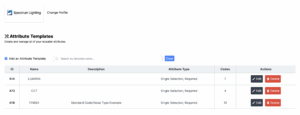 An Attribute Template is a pre-defined attribute that can be applied to multiple products or configurations. This saves time and helps maintain uniformity when managing attributes that are frequently used, such as standard dimensions, colors, or finish options.
How to Create an Attribute Template
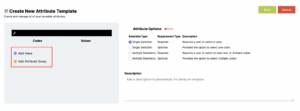
The process of creating an Attribute Template mirrors the steps for creating a product attribute. If you’re already familiar with creating attributes, you’re well-equipped to create a template.
To ensure you have the necessary knowledge to proceed, we recommend reviewing our article on Building and Organizing Ordering Logic. This article provides a step-by-step guide on the process, which directly applies to creating templates.
Why Use Attribute Templates?
- Reusability: Avoid repetitive work by applying a template to multiple configurations.
- Consistency: Ensure attributes are standardized across your products.
- Efficiency: Save time during the configuration process.
For additional guidance or questions, please reach out to our support team or consult the Building and Organizing Ordering Logic article to get started.