

Footnotes are an essential tool in The Lighting Exchange’s product configurator that provide users with additional product information to aid in specification guidance. They serve two main purposes:
- Informational Guidance: Footnotes can offer helpful details about a product’s attributes or specifications that are purely informational. Ex: “Nominal Delivered Lumens Are Shown, Refer to Photometric Data for Delivered Lumens.”
- Product Constraints: Footnotes can describe limitations or restrictions associated with product configurations. Ex: “Emergency options are not available in IC or Chicago Plenum Housing options.”
Key Features and Notables
- No Logic Contained: Footnotes do not include rule logic; instead, they provide guidance and can reference rules that contain the necessary logic.
- Reusable and Flexible: A single footnote can be applied to multiple product codes, attributes, or attribute groups, reducing redundancy.
- Multiple Application Levels: Footnotes can be applied at various levels, including:
- Entire attribute
- Attribute group
- Individual product code
- Multiple attributes, groups, and/or values
Creating Footnotes

Users can create a footnote by clicking the blue plus sign icon (+). This action allows the user to input relevant text that will be associated with specific product codes, attributes, or attribute groups.
Managing Footnotes
When applying a footnote, users have two options:
- Create a New Footnote:

Enter new footnote text and assign it to the relevant elements. - Add to Existing Footnote:
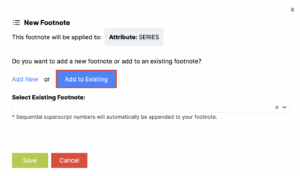
Select the “Add to Existing” button to reuse previously created footnotes across multiple attributes, groups, or values.
Automatic Footnote Organization
The Lighting Exchange system automatically organizes footnotes by sequential superscript numbers. These numbers are appended to the footnote/code relationship in the following order:
- Left to Right
- Top to Bottom
This ensures a consistent and clear presentation within the complete ordering logic.
By efficiently leveraging footnotes, users can streamline the product specification process while maintaining clarity and consistency across all product configurations.