
The Lighting Exchange® Product Sync process is an automated way to keep your products seamlessly up-to-date with all of your LEX Subscribing Agencies. Whether you’ve added new products, published a new website, or discontinued old products, synchronizing your product content has never been easier!
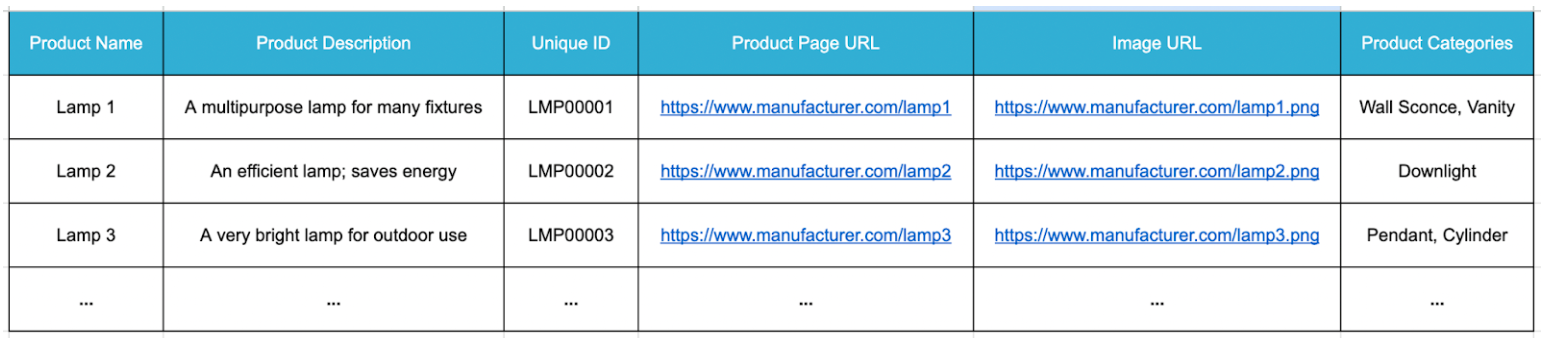
The six fields of information you need in order to properly sync your products with The Lighting Exchange® are as follows:
-
- Product Name
- Product Page URL
- Short Description
- Image URL
- Unique Identification – The Unique ID allows our team to map your product information to each of your product entries in our system and will allow for seamless future product updates. Each product’s Unique ID should consist of characters that should never be changed or duplicated.
- Product Categories – Adding Product Categories will ensure your products are correctly tagged upon upload. Each Product Category should be separated by a comma, and should match the categories that we offer in The Lighting Exchange®. Product Categories only need to be included for products that are new to our system.
Export the above required data from your website or database into a .csv spreadsheet file.
Email your .csv file to [email protected] and The Lighting Exchange® Data Team will handle the rest!