

The Lighting Exchange Product Configurator provides three distinct code type options to help manufacturers efficiently organize their product attributes: Standard, Scale, and Dropdown. Choosing the right code type ensures seamless product configuration and enhances the user experience. Below is a breakdown of each code type to help you determine which one best fits your needs.
Code Type #1 – Standard
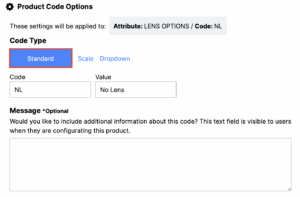
The Standard code type is the most straightforward option, offering a traditional Code and Value relationship. It is ideal for attributes that require a simple, fixed identifier.
Key Features:
- Code (Required): Each attribute must include a unique code.
- Value (Optional): A descriptive value can be included but is not mandatory.
- Description (Optional): Each code can contain an additional description for further clarification.
When to Use:
- When product attributes need unique codes without requiring a range.
- When optional values can provide further context.
- Example: Finish codes such as WH for White or BLK for Black.
Code Type #2 – Scale
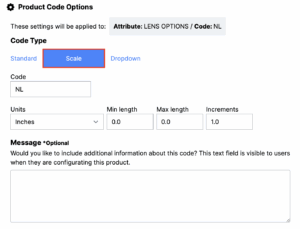
The Scale code type is designed for products that are specified in ranges or involve variables that require specific numerical increments.
Key Features:
- Scale Minimum and Maximum: Users can define the range of acceptable values.
- Unit Increments: Allows users to set the incremental steps within the range.
- Unit of Measurement: Select from a pre-populated list, including Feet, Inches, Watts, Hours, etc.
When to Use:
- When the attribute values fall within a defined numerical range.
- When units of measurement are essential to product specification.
- Example: Linear fixture length ranging from 4′ min. to 40′ max. in increments of 4′.
Code Type #3 – Dropdown
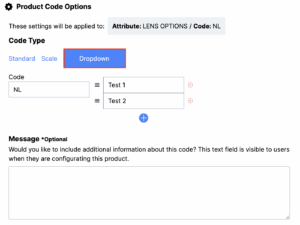
The Dropdown code type provides an easy-to-use selection method where administrators can create a list of predefined options for configurator users to choose from.
Key Features:
- Predefined Options: Admins create a fixed list of selectable values.
- User Selection: Configurator users select an option from the dropdown.
When to Use:
- When users need to select from a finite set of options.
- When standardizing selections to prevent errors or inconsistencies.
- Example: Voltage options such as 120V, 277V, 347V.
Conclusion
Selecting the appropriate code type is crucial for accurate product configuration. Use the guide below to match your attribute needs with the right code type:
Product Code Types |
|
|---|---|
| Attribute Requirement | Recommended Code Type |
| Simple code and optional value | Standard |
| Numerical ranges with units | Scale |
| Fixed list of selectable options | Dropdown |
By understanding and applying these code types effectively, you can optimize your product data organization and improve users’ configurator experience.